Defect Tracking
This article outlines a simple defect workflow, the key data worth tracking and how to use it for basic project insights.
Bug tracking is often seen as administrative overhead — something that slows teams down rather than helps them deliver faster. In practice, the opposite is true: defect tracking is an effective tool for improving predictability and project outcomes.
Projects that underestimate defect tracking can end up with unpredictable releases and hidden rework.
In this article, I use “defect” as a general term rather than “bug”, since defects can exist beyond source code (requirements, design, infrastructure, etc.).
If a defect is not resolved immediately, it should be captured in a ticket. A ticket workflow is part of tracking defects and represents the life cycle of such a ticket. I worked on several projects where I needed to either introduce defect tracking altogether or adjust existing defect tracking workflows.
Defect ticket workflows
This workflow is my generalized model I use as a starting point and adapt per project.
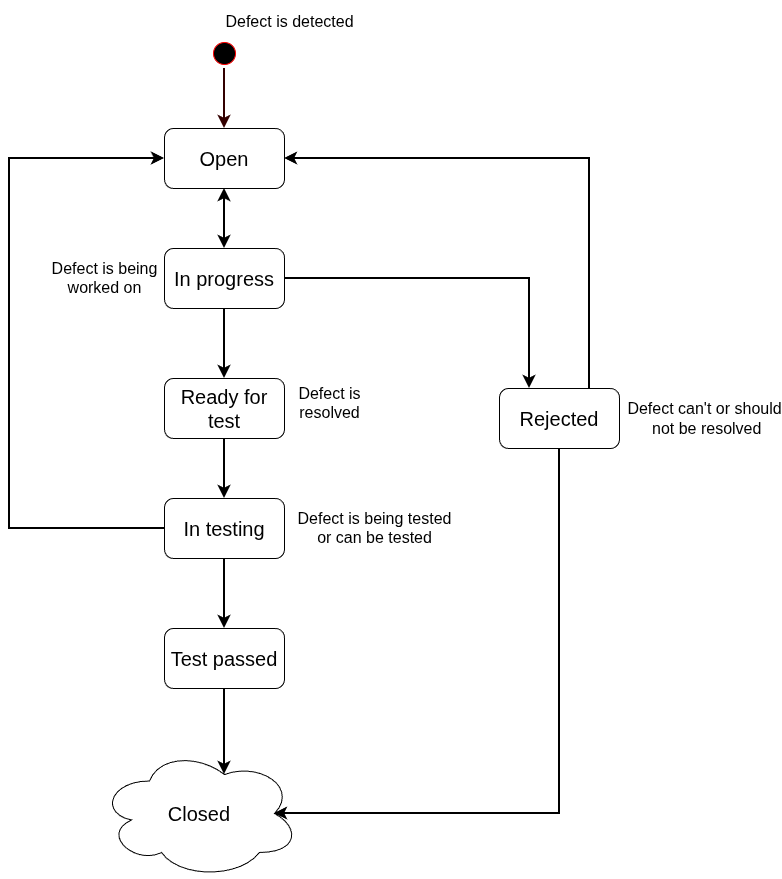
The last state Closed is depicted as a cloud, because there could be more states that represent specific testing/stage environment (for simpler projects Closed can be a terminal state).
I leave some states intentionally ambiguous, because they should be adapted to different project contexts. In the final workflow it’s best to explicitly define what the states mean and also preconditions and postconditions for each one.
A high-level explanation of the states in the diagram is in the following table:
| State name | Description | Can transition to | Brief transition explanation |
|---|---|---|---|
| In Progress | Work on defect has started (analysis, implementation etc.). | Open, Ready for test, Rejected | Transition to Open again if something is missing in the ticket or Rejected if defect will not be fixed. |
| Ready for test | Defect was fixed and is ready to be tested. | In Testing | Set this state if the defect was fixed from the ticket assignee perspective. |
| In Testing | One can choose if this state means “ticket is being tested” or “ticket can be picked up for testing”. | Test pass, Open | If defect is still present, change state back to Open; Test pass otherwise. |
| Rejected | Defect was rejected. | Closed, Open | If rejections is accepted, transitions to Closed; otherwise reassigned and move back to Open (usually after an agreement between defect reporter and ticket assignee). |
| Test pass | Ticket has been tested and the defect is resolved | Closed | Between Test pass and Closed some other activities might occur (like deployments, UAT tests, etc.) |
| Closed | Defect is resolved and no other activity is needed. | — | A closed ticket can’t transition to any other state, because it’s deemed finished |
Defect ticket fields
Adding more than a description of the defect adds valuable information that enhances project analytics and improves visibility.
Adding reason to rejected defect tickets
I find it useful to include a reason field for rejected tickets. A reason is just a short description that is added as explicit field in the ticket.
The reason should be recorded once there is agreement that the ticket will be rejected, e.g. when the ticket transitions from Rejected state to Closed state.
If the ticket was valid, and it was successfully resolved the reason value does not need to be empty. For example the value can be automatically set to “Fixed” (this prevents problems with empty fields during ticket processing/analytics). Certain reasons for rejected bug tickets tend to repeat; in the table below I summarize the most common ones I encountered:
| Reason value | Description |
|---|---|
| Fixed | The defect was valid and it was fixed |
| Change request | The defect was rejected because it’s a change in existing functionality (i.e. it’s not a defect, it’s a change request) |
| Duplicity | This defect was already reported and is being tracked elsewhere |
| Not a defect | The discovered defect is not a defect, the behavior of the system is correct (i.e. meets the requirements) |
| Not reproducible | The described behavior is not reproducible and thus can’t be fixed |
| Accepted | It was decided that the defect won’t be fixed (ideally this should trigger update of requirements as the observed behaviour will be the expected behaviour) |
| Other | Does not match any of the above |
Additional defect ticket information
Additional information can also be attached to a ticket. The table below outlines what data I found useful to track and coincidentally that list also matches what the testing literature recommends 😃. As mentioned earlier, it needs to be tailored to each project’s characteristics (such as size, process maturity, staff etc.)
| Additional information | Description |
|---|---|
| Impact | Short description of the impact on the system from business perspective. Note that this is different from priority - priority should take impact into account. |
| Root cause component | Component/Service that caused the defect. Some defects might have several root causes. |
| Defect origin | Where did the defect originate? Examples: Requirements, Design, Coding, Infrastructure, … |
| Severity | Classification of the defect based on impact. Note that this also is different from priority — a defect ticket can have low severity, but a high priority (e.g. a typo in company address). |
| Environment detected | Where was the defect found. |
| Defect type | User Interface, documentation, performance etc. |
Charting defect tickets
Using the ticket data above, it is now possible to get a useful initial overview using these three charts:
| Chart name | Description |
|---|---|
| Histogram of defects by component | Any chart type that helps identifying components with higher risk of causing issues. |
| Defect origin trend | X-axis - time (e.g. months), Y-axis - Number of defects aggregated by defect origin. |
| Overall defect trend | X-axis - time (e.g. months), Y-axis - Number of defects aggregated by defect severity. |
These charts help understand:
- Which types of issues dominate the project (if any)?
- Are there components that need special attention?
- Are defects increasing or decreasing over time (schedule impact)?
Conclusion
Defect tracking is often dismissed as administrative overhead, especially as the industry shifts toward early releases and frequent patching (e.g. in the gaming industry). It may seem as unnecessary busy-work.
First, lack of visibility into defect volume, severity and impact undermines project decision-making (e.g. risk assessment, release planning, staffing etc.).
And second, reduced visibility leads to lower project predictability, which in turn increases:
- Waste — fixing avoidable defects,
- Unevenness — unpredictable spikes in bug fixing,
- Overburden — crunch before releases or milestones,
in Lean terms, these correspond to Muda, Mura, and Muri — the “3Ms” of the Toyota Production System.
Tracking defects helps surface these issues early, before they compound and result in inefficiency that far outweighs the overhead of any defect tracking.